Klondike Solitaire Guide: Rules, Strategy, Solver
Klondike is the solitaire game most people picture when they hear the word: seven tableau columns, a stock pile, four foundations from Ace to King. About one in five deals is unwinnable from the moment the cards are dealt. This guide covers the rules, the difference between Draw 1 and Draw 3, six concrete strategies, the browser-side solver that tells you in real time whether your game still has a solution, the sourced research on winnability, and the unlikely Microsoft history that turned a 1988 intern project into the most-used application in Windows.
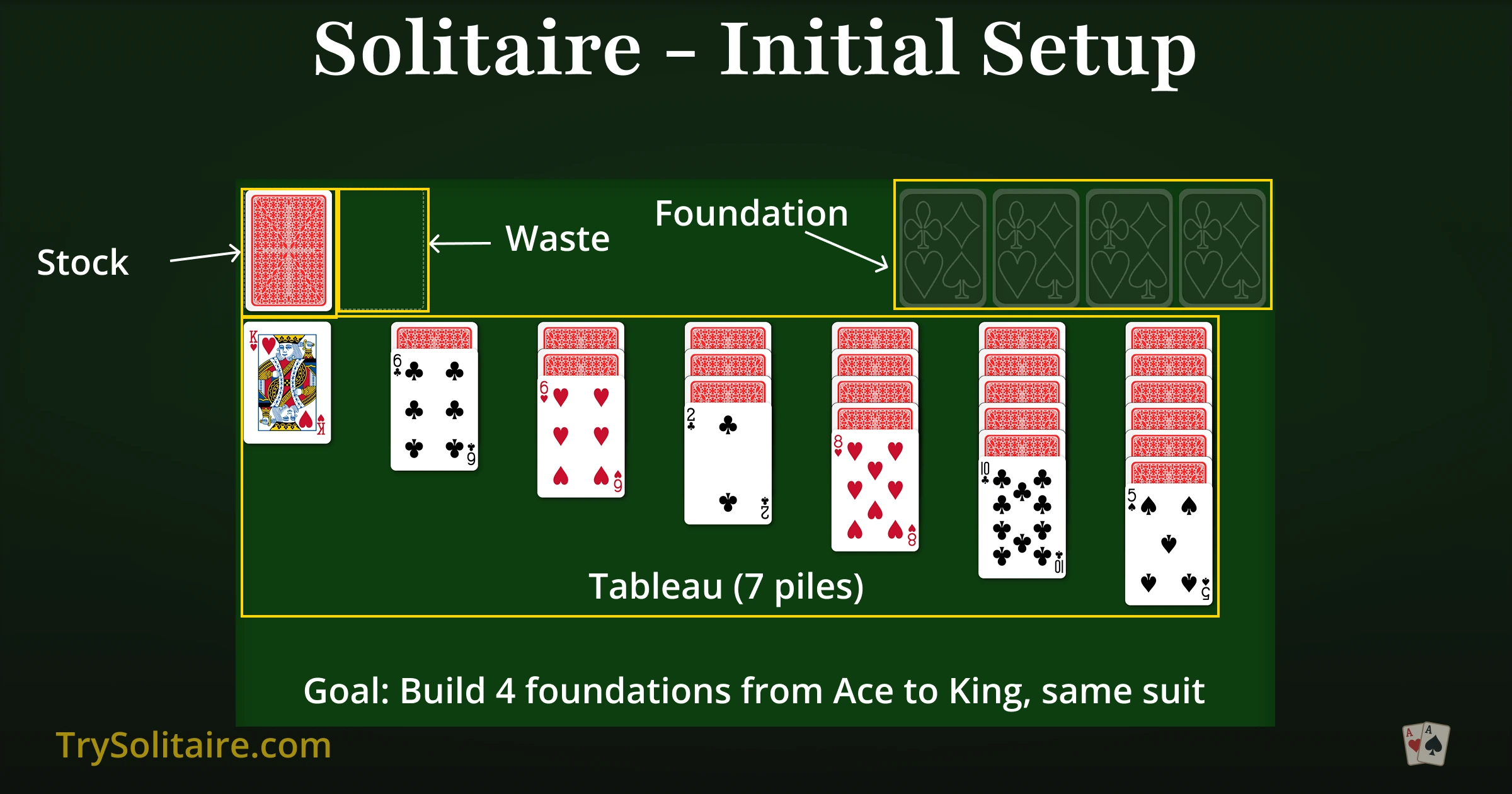
Table of Contents
What Is Klondike?
Klondike is a one-player card game played with a standard 52-card deck. The goal is to move every card to four foundation piles, each built up by suit from Ace to King. The game's distinctive feel comes from its asymmetry: most of the deck starts hidden under face-down cards in the tableau, the rest sits in a face-down stock pile, and the player has to uncover, sort, and stack their way to a complete set of four foundations.
The name comes from the late-1890s gold rush in the Klondike region of Yukon, Canada. The card layout itself is older — versions of the game were already documented in 19th-century European patience books — but the "Klondike" label stuck in the English-speaking world. In British English the same family of games is usually just called "Patience."
The Layout
The Klondike board has four areas:
- Tableau: seven columns of cards. The first column holds 1 card, the second 2, and so on up to 7 in the seventh. Only the top card of each column is face-up; the rest start face-down.
- Stock: the remaining 24 cards, face-down in the top-left corner.
- Waste: where stock cards land face-up after you draw. Only the top of the waste is in play.
- Foundations: four empty spaces in the top-right corner, one per suit. Each foundation builds up from Ace to King.
You win when all four foundations are complete with 13 cards each.
The Rules
Tableau moves
Build tableau columns down by alternating colors. A black 9 goes on a red 10. A red Queen goes on a black King. Move properly ordered sequences as a single group when the alternating-color rule holds throughout. A face-down card flips face-up automatically when the card on top of it moves away.
Empty columns
Only Kings can fill an empty tableau column. (A King can be placed alone, or together with the entire alternating-color sequence stacked beneath it.) This is the single biggest difference from FreeCell, where any card fills an empty column.
Stock and waste
Click the stock to draw cards into the waste. In Draw 1 mode you flip one card at a time; in Draw 3 you flip three at once but only the top is playable. When the stock empties, click the empty space to recycle the waste back into the stock and continue. Most digital versions allow unlimited recycles.
Foundations
Foundations build up by suit, Ace to King. Aces start a foundation; you can add the matching 2, then 3, and so on. You can move a card back from a foundation to the tableau if it would help — most digital versions allow this with no penalty, though some apply a small score reduction.
Draw 1 vs Draw 3
The two modes use the same deals, the same rules, and the same theoretical winnability. They differ in how you reach the stock pile.
| Aspect | Draw 1 | Draw 3 |
|---|---|---|
| Stock draw | One card at a time | Three cards; only the top is playable |
| Theoretical win rate | ~82% | ~82% (same deals) |
| Practical win rate (skilled play) | ~40% | ~10–15% |
| Stock cycles | Unlimited | Unlimited |
| Recommended for | Beginners, casual play | The traditional challenge |
The win-rate gap comes from access. In Draw 3, useful cards often land in the middle of a triplet and stay buried until you cycle the entire stock again. The deal itself is no harder; it's just that the path to the cards you need is longer. In our version, both modes use the same browser-side solver, so you can compare your moves against a known-winnable solution in either.
Six Strategies That Actually Work
1. Expose face-down cards before anything else
A face-down card is information you don't have. Flipping it is almost always more valuable than sending a card to the foundation. The exception: very early Aces and 2s, which serve no useful tableau role anyway.
2. Move Aces and 2s up immediately
Aces and 2s have no productive part to play in the tableau. They block the cards above them and they can't extend a sequence. Send them up the moment they're exposed.
3. Don't empty a column without a King ready
Empty tableau columns are valuable, but only if you can actually place a King in them. Emptying a column with no King available — and no face-down stack above one in another column — is wasted leverage. The empty column will sit unused while better moves slip away.
4. Don't rush past the 5s to the foundation
A 4 sent to the foundation can no longer cover a 5. A 5 sent up can no longer cover a 6. Cards in the middle ranks (4 through 9) are often more useful in the tableau than on the foundation. A common rule from competitive Klondike play: keep each foundation no more than two ranks behind the lowest active card of the opposite color.
5. Cycle the stock before forcing a tableau move
If the tableau seems stuck, draw a few stock cards before making a desperation move. A card you haven't seen yet may be the move that opens the position. This is especially important in Draw 3, where useful cards spend most of their time invisible.
6. Use the solver before you commit to a hard move
If you're about to make a move that feels risky, click the solver icon first. If the position is still green after the move, you're fine. If it turns red, you've just closed the only winning path — use Undo to back out and try a different line.
The Built-in Solver
About one in five Klondike deals is unwinnable no matter how well you play. Without a solver, you can spend ten minutes on a doomed game without knowing. Our solver runs entirely in your browser as a Web Worker — your moves never leave your device — and tells you in real time whether the current position still has a winning path.
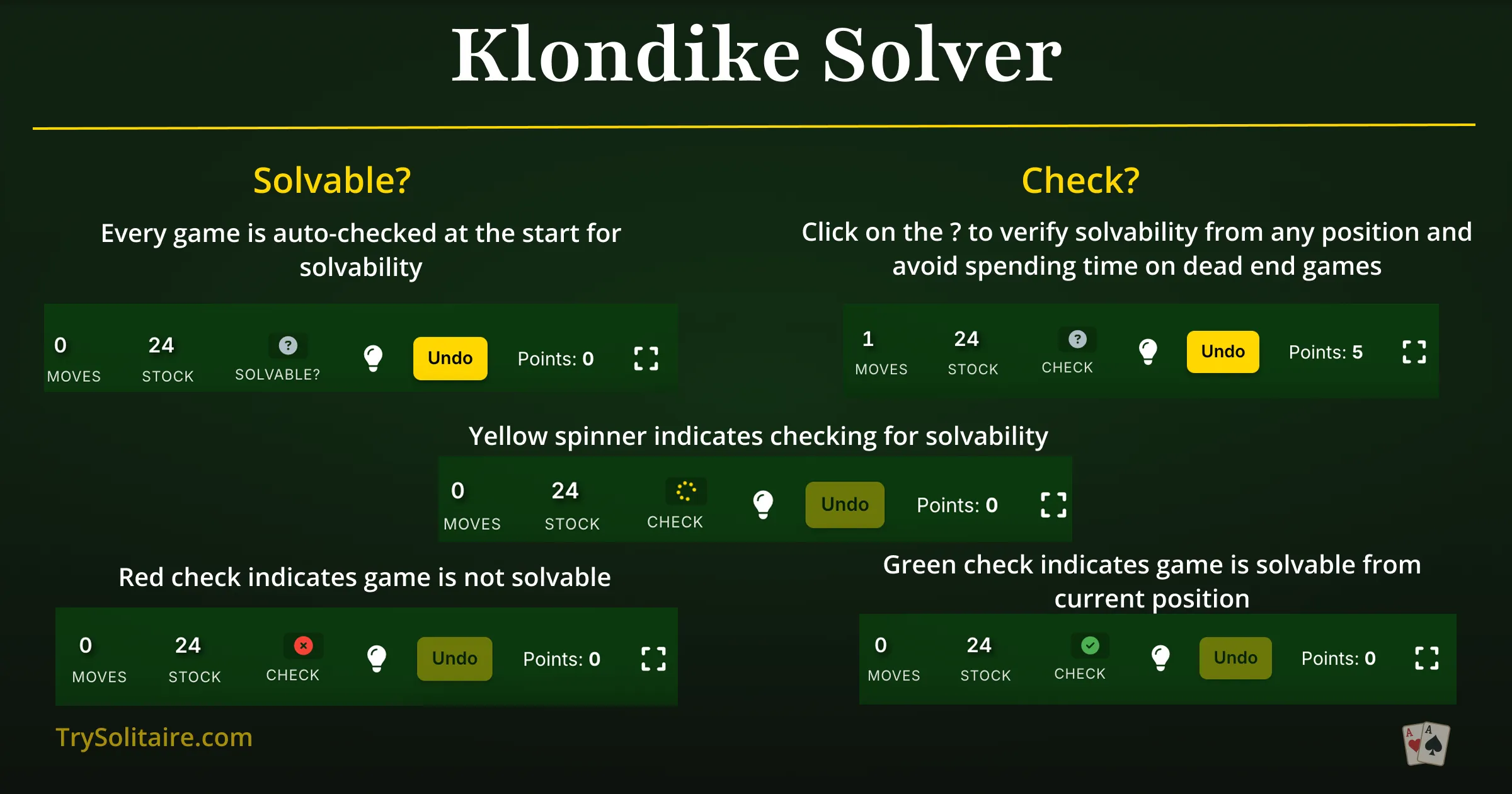
What the four states mean
- Green checkmark: a winning path exists from this position. You may not see it yet, but it's there.
- Red X: no winning path exists. A move you made — or the deal itself — closed the door. Click for recovery options.
- Gold spinner: the solver is analyzing. Most checks finish in a couple of seconds; very tangled positions can take longer.
- Gray question mark: the solver hasn't checked this position yet. Click to run it.
How it actually works
The solver is a depth-first search over the tree of legal Klondike moves. Starting from your current position, it explores moves that look promising — usually those that uncover face-down cards or extend the foundations — and prunes branches that are demonstrably worse. The search runs in a Web Worker, separate from the main game thread, so it doesn't freeze the interface while it thinks. Searches use the current draw mode (Draw 1 or Draw 3), since the same deal can have a solution in one mode but not the other.
Solver-powered features
Deal Winnable
Choose Deal Winnable in the new-game menu and the solver picks a seed with a verified solution before any cards are dealt. You skip the impossible deals entirely. Available in both Draw 1 and Draw 3.
Undo to Winnable
When the solver detects your position has become unsolvable, it offers to rewind to the last position that still had a solution. You don't lose your progress — you just back up a few moves and try a different line.
Recovery Panel
The recovery panel appears automatically when the solver finds no winning path. Four options: Undo to Winnable (most useful), Undo One Move, Restart the same deal, or Deal a new winnable game.

How Often Can You Win?
Klondike's winnability has been a research question since the 1990s, and the literature is messier than most casual sources suggest. Here are the numbers that hold up to scrutiny.
Theoretical winnability
The most-cited result is from Yan, Diaconis, Rusmevichientong and Van Roy (2005), who used a Markov-chain Monte Carlo approach and concluded that approximately 82% of Klondike deals are solvable with perfect play. That figure applies to the deals themselves and is the same in Draw 1 and Draw 3 — the deck is the same; only access changes.
Practical winnability
What players actually achieve is much lower. Reasonable estimates from large-scale casual play data:
- Draw 1, skilled play: ~40% of games won.
- Draw 1, average player: 25–30%.
- Draw 3, skilled play: ~10–15%.
- Draw 3, average player: 5–10%.
The Draw 3 gap is access, not difficulty: the same deals are theoretically winnable, but the stock-pile constraint makes it harder to reach the moves you need.
Where the wrong numbers come from
Some sources confidently report figures like "21% of Draw 1 games are unwinnable, 70% of Draw 3 games are unwinnable." Those numbers are not from primary research; they appear to be conflations of theoretical winnability with practical win rates. The right framing is two separate facts: ~82% of deals are theoretically solvable in either mode, and skilled players win about half the deals their mode allows them to.
A Short History
The card game predates the computer game by about a century. Klondike-style patience games appear in 19th-century European card-game collections, and the "Klondike" name caught on in North America during the late-1890s Yukon gold rush.
The computer version most people know was written in the summer of 1988 by Wes Cherry, then an intern at Microsoft. Cherry's version included a "boss key" that switched the screen to a fake Excel spreadsheet — a feature he was asked to remove before release. The card faces were designed by Susan Kare, the artist behind the original Macintosh icon set.
Microsoft bundled the game with Windows 3.0 in 1990. Officially, the goal was to teach mouse skills — drag-and-drop, click-targeting — to users still adjusting to a graphical interface. By 1994 Microsoft itself acknowledged that Solitaire had become the most-used application on Windows. Some version of the game has shipped with every Microsoft Windows release since.
Klondike Variants
Klondike sits at the center of a wider family of solitaire games. The main siblings worth knowing:
- Yukon: the same seven-column tableau, but no stock pile. All 52 cards are dealt face-up across the columns, and you can move any face-up card with the cards beneath it as a single group, regardless of order. Try Yukon.
- Vegas Klondike: standard rules with a scoring twist — you "buy" the deck for $52 and get $5 back per card sent to a foundation. Some Vegas rules limit you to one or three passes through the stock.
- Double Klondike: two decks, ten tableau columns, eight foundations. More space, more cards, fewer dead ends. Try Double Klondike.
- East Haven: Klondike rules with a Spider-style stock — the stock deals one card to every column when you click it, instead of going to a waste pile. Try East Haven.
- Spider: not strictly a Klondike variant, but the most popular alternative. Ten columns, build down regardless of color, complete King-to-Ace runs to clear them. Try Spider.
- FreeCell: related more by convention than by rules — uses the same deck and foundations but every card is face-up and four "free cells" replace the stock. Almost every deal is winnable. Try FreeCell.
Frequently Asked Questions
Are all Klondike games winnable?
No. About 82% of Klondike deals are theoretically winnable with perfect play, per Yan et al. (2005); the rest are unwinnable from the moment the cards are dealt. Skilled players actually win about 40% of Draw 1 games and 10–15% of Draw 3 games. Our browser-side solver tells you in real time whether your current position still has a solution.
What's the difference between Draw 1 and Draw 3?
Both modes use the same deals and the same ~82% theoretical winnability. Draw 1 flips one card at a time from the stock; Draw 3 flips three but lets you play only the top. The Draw 3 access pattern buries useful cards mid-triplet, so the practical win rate drops sharply even though the deals themselves are no harder.
Who created the Microsoft Windows version of Klondike?
Wes Cherry, an intern at Microsoft, wrote the Windows version of Solitaire in the summer of 1988. Susan Kare — known for the original Macintosh icons — designed the card faces. Microsoft included the game in Windows 3.0 in 1990, and a version of it has shipped with every Microsoft Windows release since.
How does the Klondike solver work?
It runs as a Web Worker entirely inside your browser — no game data leaves your device. From your current position the solver explores the tree of legal moves, looking for a sequence that completes all four foundations. If a winning path exists the indicator turns green; if not, it turns red and offers recovery options. A typical check finishes in a few seconds.
Can I always start with a winnable deal?
Yes. Choose "Deal Winnable" in the new-game menu and the solver picks a seed with a known solution before any cards are dealt. Available in both Draw 1 and Draw 3. You'll never spend time on a deal that was already lost before your first move.
What happens if my game becomes unsolvable?
When the solver detects no winning path remains, a recovery panel appears with four options: undo to the last winnable position, undo a single move, restart the same deal, or deal a new winnable game. "Undo to Winnable" is usually the most useful — it lets you try a different line without losing your progress.
Try It Yourself
The fastest way to internalize the strategies above is to play a few games with them in mind — and to use the solver as a coach when something goes wrong.
Play Klondike FreeReferences & Sources
- Yan, X., Diaconis, P., Rusmevichientong, P., & Van Roy, B. (2005). "Solitaire: Man Versus Machine." Advances in Neural Information Processing Systems 17, 1493–1500. The peer-reviewed Markov-chain Monte Carlo result establishing approximately 82% theoretical Klondike solvability. Same figure applies to Draw 1 and Draw 3 — the deck is the same, only access changes.
- Bjarnason, R., Fern, A., & Tadepalli, P. (2009). "Lower Bounding Klondike Solitaire with Monte-Carlo Planning." Proceedings of ICAPS 19. Independent estimate consistent with Yan et al. and the basis for several modern Klondike solver designs.
- The Strong National Museum of Play. World Video Game Hall of Fame, 2019 induction. museumofplay.org. Microsoft Windows Solitaire was inducted in 2019.
- Kare, Susan. Designer portfolio. kare.com. Designer of the original Microsoft Solitaire card faces and the original Apple Macintosh icons.
- Microsoft. Microsoft Solitaire Collection. Microsoft Solitaire. Launched with Windows 8 in 2012; bundles Klondike, Spider, FreeCell, Pyramid, and TriPeaks.
- Parlett, David. The Penguin Book of Patience. Penguin, 1979. Standard reference for solitaire game histories and rule provenance.