The Safest, Easiest Solitaire for Seniors
Enjoy the classic card game you love without the frustrations of modern technology. No confusing downloads, no fake virus warnings, and no tiny buttons. Just pure, relaxing solitaire designed for visibility and ease of use.
▶ Click Here to Play NowWhy TrySolitaire is the Best Choice for Seniors
🛡️ 100% Safe
Most free solitaire sites push disguised "download" buttons and fake browser warnings that drop adware on your computer. TrySolitaire ships none of that — no fake downloads, no fake virus alerts. You can click around without worrying about installing something you didn't want.
👁️ Large, Easy-to-Read Cards
We use clear card faces and readable numbers. You can change the card back and card style, pick from eleven table themes, and raise the text size to find what works best for your eyes.
🧠 Real Mental Exercise
Studies suggest that card games like solitaire can help maintain cognitive function, memory, and focus. It's a fun way to keep your mind sharp and active every day.
📶 Works Without Internet
Travelling or have spotty Wi-Fi? No problem. Once you load TrySolitaire, it works completely offline. You can play on airplanes, in waiting rooms, or anywhere else.
How to Get Started (It's Easy!)
- Click the green "Play Now" button on this page.
- The game will load instantly. There is no sign-up required.
- Drag cards with your mouse or finger (on tablets/phones).
- If you make a mistake, just click "Undo" - you can undo as many times as you want!
Setting this up for a parent or grandparent? Our step-by-step guide for caregivers shows how to get them playing in about two minutes, and which games are easiest to start with.
What Caregivers & Seniors Are Saying
"I was always worried about my dad getting lost or confused on other game sites. TrySolitaire is the only one I trust him to use. It's so clean and simple."
— Sarah M., Caregiver
"Finally, a solitaire game I can actually see! The cards are big and clear, and I love that I don't have to create an account."
— Robert, 72, TrySolitaire Player
What Solitaire Does for an Aging Mind
Playing solitaire is much more than a pleasant way to pass the time. For seniors, it is one of the most accessible forms of daily mental exercise available. Research published in journals such as The Journals of Gerontology and the New England Journal of Medicine has consistently shown that regularly engaging in card games and puzzles is associated with a lower risk of cognitive decline and may help delay the onset of dementia-related symptoms.
🧩 Memory Improvement
Every game of solitaire asks you to remember which cards have been played, which are still in the deck, and where key cards are located. This gentle, repeated memory work strengthens short-term recall over time. Many players notice that their everyday memory — remembering names, grocery lists, or appointments — feels sharper after making solitaire a daily habit.
🔍 Pattern Recognition
Solitaire trains your brain to spot patterns quickly: alternating red and black cards, recognizing sequences, and identifying which moves open up new possibilities. Pattern recognition is a fundamental cognitive skill that supports everything from reading to navigating your surroundings safely. The more you play, the faster these connections form.
♟️ Strategic Thinking
Should you move that King now or wait? Is it better to draw from the stock pile or rearrange the tableau? Solitaire presents a steady stream of small decisions that exercise your planning and reasoning abilities. This kind of light strategic thinking keeps the mind nimble without the stress or pressure of competitive games.
🖱️ Hand-Eye Coordination
Dragging cards on a screen or tapping to move them to the right position gently exercises fine motor skills and hand-eye coordination. For seniors using a tablet or computer, this regular, low-pressure practice helps maintain the dexterity needed for other everyday tasks like using a phone, typing messages, or browsing the internet with confidence.
The beauty of solitaire as a brain exercise is that it never feels like work. Unlike formal brain-training programs, a game of solitaire is enjoyable first and beneficial second. You can learn more about the rules and strategies in our complete guide to playing solitaire, or simply start a free game right now and let the benefits come naturally.
Accessibility Features Designed for You
Many online games were built for younger audiences and can be frustrating for older players. TrySolitaire was designed from the ground up with seniors in mind. Every feature has been tested to make sure it is comfortable and easy to use, regardless of your experience with technology.
🃏 Large, Clear Cards
Our cards are significantly larger than what you will find on most solitaire websites. The numbers and suit symbols are bold and easy to read, even from a normal sitting distance. No more squinting or leaning in to tell a 6 from an 8.
🎨 High Contrast Display
We use strong colour contrast between the cards, the background, and the text. Red suits are truly red, black suits are clearly black, and the green playing surface provides a calm, easy-on-the-eyes backdrop. This matters especially if you have age-related vision changes.
🔤 Adjustable Text Size
You can use your browser's built-in zoom feature (usually Ctrl and the + key on a computer, or pinch-to-zoom on a tablet) and TrySolitaire will scale perfectly. Everything stays neat and usable no matter how large you make it.
✨ Simple, Clean Interface
There are no pop-ups, no flashing banners, and no confusing menus. The game screen shows only what you need: your cards, an undo button, a hint button, and a new game button. That is it. Nothing extra to distract you or cause accidental clicks.
⏸️ No Time Pressure
There is no countdown clock and no penalty for taking your time. You can think through every move at your own pace, step away for a cup of tea, and come back whenever you are ready. The game will be right where you left it.
📱 Works Beautifully on Tablets
Many seniors prefer tablets because of the larger screen. TrySolitaire works wonderfully on iPads, Android tablets, and any device with a web browser. Just open the website and start playing — the cards are perfectly sized for touch, and dragging feels smooth and natural.
Getting Started: A Step-by-Step Guide
If you have never played solitaire on a computer or tablet before, do not worry. We will walk you through everything, one step at a time. You will be playing comfortably within just a few minutes.
Step 1: Open the Game
Click the green "Play Now" button on this page, or visit our free solitaire game page directly. The game loads in your web browser — there is nothing to install or download. It works on any computer, tablet, or phone.
Step 2: Choose Your Game
We recommend starting with Klondike — this is the classic solitaire game that most people already know from playing with physical cards. If you would like to explore other variations later, you can try TriPeaks or Pyramid, which are also excellent choices for beginners.
Step 3: Understand the Screen
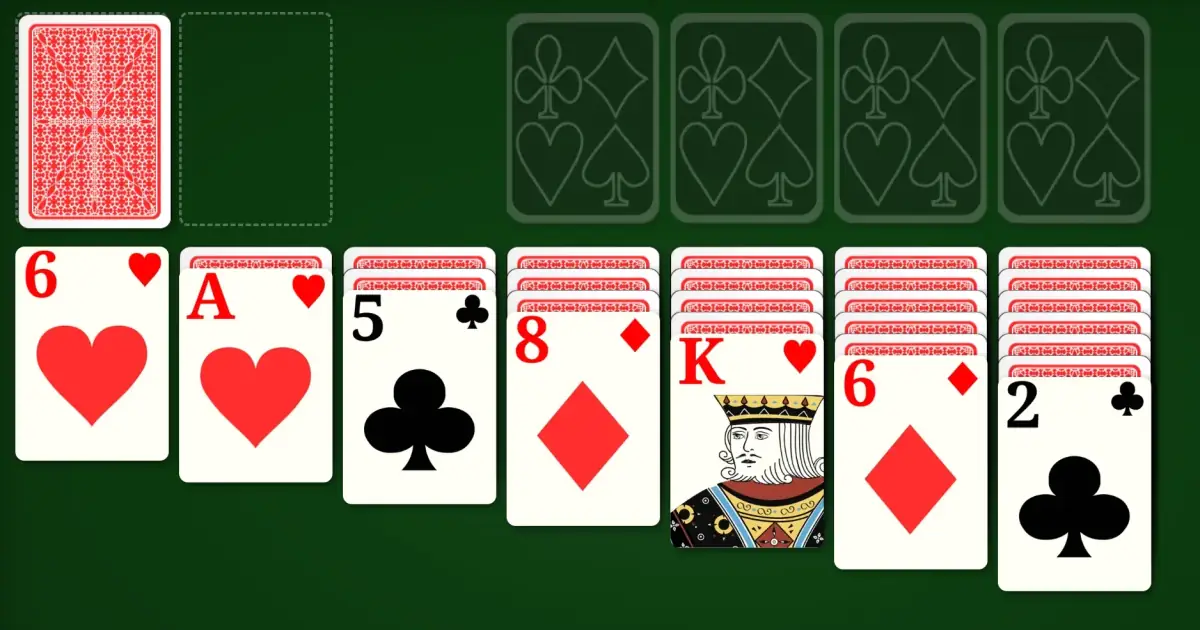
When the game opens, you will see your cards laid out in columns (this area is called the tableau). At the top, there are four empty spaces where you will build up each suit from Ace to King (these are the foundation piles). On the left, you will see the remaining deck (the stock pile) that you can click to draw new cards. For a full explanation of all the rules, visit our how to play solitaire guide.
Step 4: Make Your First Moves
Look for any Aces on the tableau and move them up to the foundation area. Then, start arranging cards in descending order, alternating between red and black. To move a card, simply click on it and drag it where you want it to go. On a tablet, use your finger to tap and drag.
Step 5: Use Undo and Hints Freely
Made a move you regret? Simply click the Undo button to go back — you can undo as many times as you like, all the way to the beginning if you wish. Feeling stuck and not sure what to do next? Click the Hint button and the game will gently highlight a suggested move. There is no penalty for using either feature, so use them as often as you like.
Best Solitaire Games for Beginners
There are dozens of solitaire variations, but you certainly do not need to learn them all. Here are three wonderful games that are perfect if you are just getting started. Each one offers a slightly different experience, so you can pick the one that appeals to you most.
♠️ Klondike (Classic Solitaire)
This is the solitaire game most people picture when they hear the word "solitaire." You arrange cards in descending order on the tableau while building up foundation piles from Ace to King. If you have ever played solitaire with a real deck of cards at the kitchen table, this is almost certainly the version you know. It strikes a lovely balance between skill and luck, and every game feels a little different. Our Klondike solitaire guide covers all the tips and strategies you might want.
🏔️ TriPeaks (Relaxing & Fun)
TriPeaks is a wonderfully relaxing game where you clear cards from three pyramid-shaped peaks. You simply select cards that are one higher or one lower than the current card at the bottom of the screen. There is no need to worry about sorting by colour or suit. Many seniors love TriPeaks because it is easy to learn, quick to play, and feels very satisfying when you clear all three peaks. It is a perfect choice when you want something gentle and enjoyable.
🔺 Pyramid (Simple Matching)
In Pyramid solitaire, cards are laid out in the shape of a pyramid, and your goal is to remove pairs of cards that add up to 13. For example, a 6 and a 7, or a 4 and a 9. Kings are worth 13 on their own, so they can be removed by themselves. The matching mechanic is very simple to understand, and the pyramid layout makes it easy to see all your options at a glance. It is a gentle, satisfying game that exercises basic arithmetic skills.
All three games are available for free on TrySolitaire. Try them now and see which one becomes your favourite.
Other Gentle Brain Games
If you enjoy solitaire's pace, these games use the same calm, no-time-pressure format and engage similar mental skills. They are all free, on this same site, with no sign-up:
- Sudoku — pure logical deduction, no card dexterity needed. Same large-text, no-sign-up format.
- Mahjong Solitaire — calm tile matching with simple click-to-match controls. Particularly forgiving on touchscreens.
- Memory Match — turn over two cards at a time and find the pairs. There is no time limit and no way to lose, so a round takes as long as you want it to.
- Word Scramble — rearrange the letters to find the word. No time limit, and three hints per puzzle if a word will not come.
Make the Cards as Large as You Like
The cards start out large and high-contrast, but you can make them bigger still. There is no menu to hunt through — you use the same zoom your browser already has:
- On a computer: hold the Ctrl key (or Cmd on a Mac) and press the + key. Each press makes everything a little bigger.
- On a tablet or phone: place two fingers on the screen and spread them apart to zoom in.
The cards, numbers, and buttons all grow together and stay neatly lined up, so nothing gets cut off or becomes hard to reach. Set it once to a size that feels comfortable, and it stays that way each time you play. Combined with the bold suit colours and the calm green background, this makes for one of the clearest large-print card games you can play online.
You can also change the cards themselves. Open the game's Settings menu to pick a different card design. The Large Simple design uses oversized, plain numbers that are especially easy to read. You can choose a card back you like and raise the text size too. Set it once, and it stays that way each time you play.
To keep the game close at hand, press the Save Game button while you play. It saves TrySolitaire to your home screen, so next time you can open it with a single tap. There is no web address to type, and the game still works without an internet connection.
Frequently Asked Questions
Here are answers to the questions we hear most often from seniors and their families.
Is solitaire good for seniors with dementia?
Yes, solitaire can be a helpful and enjoyable activity for seniors experiencing early to moderate cognitive decline. The familiar gameplay provides comfort and routine, while the act of sorting, matching, and sequencing cards gently engages memory and problem-solving skills. Several studies have found that regular engagement with card games and puzzles is associated with slower cognitive decline. Of course, solitaire is not a medical treatment, but it is a safe, calming activity that many caregivers recommend. The unlimited undo and hint features on TrySolitaire are especially helpful, as they reduce frustration and keep the experience positive.
Can I play solitaire on my tablet?
Absolutely. TrySolitaire works beautifully on all tablets, including iPads, Samsung Galaxy tablets, Amazon Fire tablets, and any other device with a web browser. Simply open your browser (Safari on iPad, Chrome or Firefox on Android tablets), go to TrySolitaire, and start playing. The cards are large and easy to drag with your finger. Many of our players tell us that playing on a tablet is their favourite way to enjoy the game because the screen is big enough to see everything clearly.
Do I need to download anything?
No, you do not need to download or install anything at all. TrySolitaire runs entirely in your web browser. There is no app to find in an app store, no software to install on your computer, and no updates to worry about. Just visit the website and play. This also means there is zero risk of accidentally installing unwanted software or viruses. Once the page has loaded, the game even works without an internet connection, so you can continue playing if your Wi-Fi goes out.
Is TrySolitaire really free?
Yes, TrySolitaire is completely free. There are no hidden fees, no premium subscriptions, and no "pay to unlock" features. Every game mode, every feature, and every card design is available to everyone at no cost. We will never ask for your credit card number. You do not even need to create an account — just visit the site and start playing immediately.
What if I get stuck during a game?
Getting stuck is perfectly normal and happens to everyone, even experienced players. TrySolitaire gives you two helpful tools. First, the Hint button will highlight a move you might have missed. Second, the Undo button lets you go back as many moves as you like, so you can try a different approach. If the game is truly unwinnable (some deals are), you can simply start a new game with one click. For more tips and strategies, visit our how to play solitaire page, which walks through common situations and the best ways to handle them.
Can my grandchildren play too?
Of course! Solitaire is a wonderful game for all ages, and TrySolitaire is safe for everyone in the family. There is no inappropriate content, and no way to accidentally make purchases. Many of our players enjoy sharing the game with younger family members — it can be a lovely way to spend time together, with grandchildren learning the rules and strategy from their grandparents.
Is TrySolitaire really free?
Yes. Every game is free to play, with no account to create and nothing to install. Many free solitaire sites bury the board under flashing panels and disguised "download" buttons that can be confusing or worrying. TrySolitaire keeps the screen calm and clear, with room only for your cards and the buttons you need.
How do I make the solitaire cards bigger?
Use your browser's zoom to enlarge everything. On a computer, hold the Ctrl key (or Cmd on a Mac) and press the + key. On a tablet, place two fingers on the screen and spread them apart. The cards, numbers, and buttons all grow together and stay neatly arranged, so you can find a size that is comfortable for your eyes.