Looking for Google Solitaire? Try TrySolitaire Instead
If you're searching for Google Solitaire, you've discovered something even better. While Google Solitaire is a solid option for quick Klondike and Spider games, TrySolitaire offers the same great gameplay you love plus 21 more games from our complete solitaire games collection, offline support, zero ads, and significantly more features. Whether you're a casual player or a solitaire enthusiast, TrySolitaire provides everything Google Solitaire offers and much more.
Best of all, TrySolitaire is 100% free with no ads, no sign-up requirements, and no interruptions. If you love playing Google Solitaire during your breaks, you'll absolutely love the expanded variety and enhanced experience that TrySolitaire delivers.
▶ Start Playing TrySolitaire Now - 100% FreeWhat is Google Solitaire?
Google Solitaire is a free online solitaire game that appears when you search "solitaire" or "google solitaire" on Google Search. Launched as an Easter egg feature, it provides instant access to two classic solitaire variants: Klondike (traditional solitaire) and Spider Solitaire. Google Solitaire has become incredibly popular due to its accessibility - no downloads, no installations, just instant gameplay right from your search results.
The game features clean, simple graphics and straightforward gameplay. You can choose between easy and hard difficulty levels in Klondike, and select 1-suit, 2-suit, or 4-suit variations in Spider Solitaire. Google Solitaire tracks basic statistics like your win rate and includes an undo button for reversing moves. For many people, it's their first introduction to online solitaire and remains a go-to option for quick gaming sessions.
However, while Google Solitaire is excellent for what it offers, it has limitations. It only provides two game variants, requires an internet connection to load, displays advertisements, and offers limited customization options. This is where TrySolitaire shines - providing all the benefits of Google Solitaire with none of the limitations.
TrySolitaire vs Google Solitaire: Complete Comparison
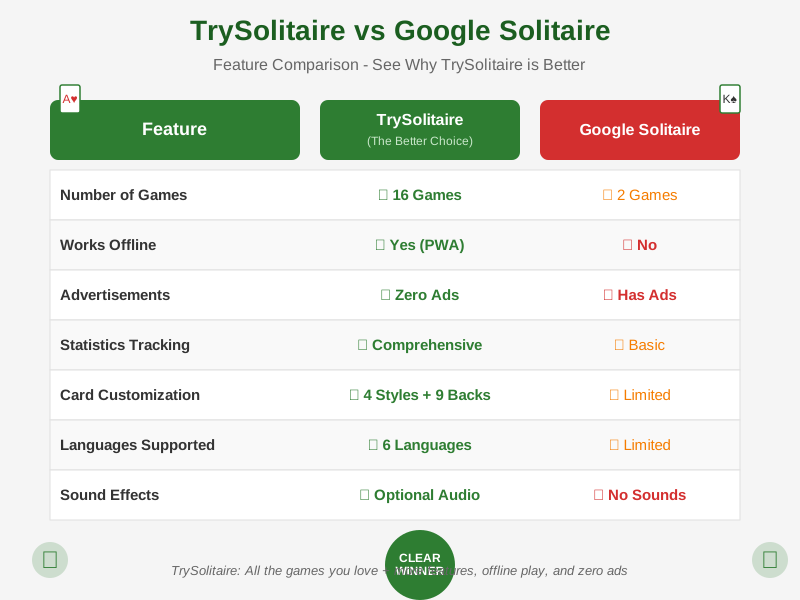
Here's a detailed side-by-side comparison showing how TrySolitaire and Google Solitaire stack up across key features:
| Feature | TrySolitaire | Google Solitaire |
|---|---|---|
| Number of Games | ✓ 23 games (20 solitaire + 3 puzzles) | ⚠ 2 games (Klondike, Spider) |
| Offline Play | ✓ Yes - Full PWA support | ✗ No - Internet required |
| Advertisements | ✓ Zero ads ever | ✗ Ads present |
| Statistics Tracking | ✓ Comprehensive (games played, won, win rate, best time, streaks) | ⚠ Basic (wins, losses, win percentage) |
| Undo Moves | ✓ Unlimited undo/redo | ✓ Yes (undo available) |
| Card Themes | ✓ 4 card styles + 9 card backs | ⚠ Limited customization |
| Mobile Experience | ✓ Fully optimized + installable PWA | ✓ Mobile responsive |
| Language Support | ✓ 6 languages (EN, ES, FR, NL, DE, HI) | ⚠ Limited language options |
| Sign-up Required | ✓ No registration needed | ✓ No registration needed |
| Loading Speed | ✓ Fast loading + caching | ✓ Fast (embedded in search) |
| Sound Effects | ✓ Optional audio feedback | ✗ No sound effects |
| Cost | ✓ 100% Free Forever | ✓ Free |
8 Reasons Why TrySolitaire is Better Than Google Solitaire
While Google Solitaire is a great starting point, TrySolitaire takes the solitaire experience to the next level. Here's why thousands of players are making the switch:
1. 23 Games vs 2 Games - Endless Variety
Google Solitaire offers Klondike and Spider - two excellent games. TrySolitaire includes those same games plus 21 more: FreeCell, Pyramid, Golf, TriPeaks, Yukon, Russian Solitaire, Scorpion, Canfield, Forty Thieves, Australian Patience, Double Klondike, Spiderette, Easthaven, Eight Off, Baker's Game, Wasp, Beleaguered Castle, Baker's Dozen, plus popular puzzle games like Sudoku, 2048, and Mahjong. Whether you want a quick 5-minute game or a 30-minute strategic challenge, you'll find the perfect game for your mood.
2. Works Completely Offline - Play Anywhere
Google Solitaire requires an internet connection to load initially. TrySolitaire is a Progressive Web App (PWA) that works completely offline once installed. Play on airplanes, during your commute through tunnels, in remote areas, or anywhere without reliable internet. Your games, statistics, and preferences are all saved locally and available instantly - no connection required.
3. Zero Ads, Zero Interruptions
Google Solitaire, like most Google services, displays advertisements between games and during gameplay. TrySolitaire has absolutely zero ads - no banners, no pop-ups, no video ads, no sponsored content. Just pure, uninterrupted solitaire gameplay. We believe you shouldn't have to watch ads to enjoy a classic card game. Our site is funded by optional donations from players who appreciate the ad-free experience.
4. More Detailed Statistics
While Google Solitaire tracks basic win/loss statistics, TrySolitaire provides comprehensive analytics for every game. Track your games played, games won, win percentage, best completion time, current winning streak, and longest streak. All statistics are saved locally and persist across sessions. Watch your improvement over time and challenge yourself to beat your personal records.
5. Extensive Card Customization
Google Solitaire offers one card design. TrySolitaire lets you personalize your experience with 4 distinct card styles (Poker Plain, French Ornate, German, American) and 9 different card back designs (Spanish, Japanese, Abstract, Astronaut, Retro, and more). Choose the aesthetic that suits your preferences and makes gameplay more enjoyable for you.
6. Full Multi-Language Support
TrySolitaire is available in 6 languages: English, Spanish, French, Dutch, German, and Hindi. Every game, menu, instruction, and help text is fully translated, making solitaire accessible to players worldwide. Google Solitaire's language support is more limited, making TrySolitaire the better choice for non-English speakers.
7. Faster Loading and Better Performance
TrySolitaire is optimized for speed. Our lightweight codebase loads in under 2 seconds and games start instantly. Once cached, the app loads from your device storage, making subsequent visits nearly instantaneous. We use modern web technologies to ensure smooth animations, responsive controls, and efficient battery usage - especially important for mobile players.
8. No Time Limits or Restrictions
Play as long as you want, whenever you want. There are no session limits, no daily caps, no "energy" systems, and no premium features locked behind paywalls. Every feature is available to everyone immediately. TrySolitaire respects your time and doesn't manipulate you with artificial restrictions designed to sell upgrades.
The Bottom Line
If you enjoy Google Solitaire, you'll love TrySolitaire even more. We've taken everything that makes Google Solitaire great - instant play, clean interface, no sign-up - and enhanced it with more games, better features, and zero compromises. Join thousands of former Google Solitaire players who have made TrySolitaire their new favorite solitaire destination.
How to Play Solitaire (Google Solitaire Rules)
Whether you're coming from Google Solitaire or new to the game entirely, here's a quick overview of how to play the two most popular variants:
Klondike Solitaire (Classic Solitaire)
Klondike is the traditional solitaire game that most people think of when they hear "solitaire." The goal is to build four foundation piles from Ace to King, separated by suit. Cards in the tableau (the main playing area) must be arranged in descending order with alternating colors. You can move cards from the stock pile (draw pile) to either the tableau or foundations. Google Solitaire offers both Easy (Draw 1) and Hard (Draw 3) difficulty levels - TrySolitaire includes both as well.
Spider Solitaire
Spider Solitaire uses two decks (104 cards) and challenges you to build complete sequences from King to Ace in the same suit. Once a complete sequence is built, it's automatically removed from play. The difficulty varies based on the number of suits: 1-suit is easiest (all spades), 2-suit is medium (spades and hearts), and 4-suit is expert level (all suits). Both Google Solitaire and TrySolitaire offer all three difficulty levels.
For complete rules, strategies, and tips, check out our comprehensive guides: Klondike Guide and Spider Guide.
Making the Switch from Google Solitaire to TrySolitaire
Transitioning from Google Solitaire to TrySolitaire is effortless. Here's what you need to know:
Same Familiar Games
TrySolitaire includes the exact same Klondike and Spider Solitaire games you're used to playing on Google. The rules, gameplay, and mechanics are identical - you'll feel right at home.
Similar Interface
We've designed TrySolitaire with simplicity in mind. The clean, intuitive interface feels familiar while offering more options when you want them. No learning curve required.
Instant Play
Just like Google Solitaire, there's no sign-up or download required. Visit the site and start playing immediately. Bookmark TrySolitaire and access it just as quickly as you access Google Solitaire.
Install as an App
Unlike Google Solitaire, you can install TrySolitaire as a Progressive Web App. Add it to your home screen (mobile) or desktop and launch it like a native app - no browser required.
What TrySolitaire Players Are Saying
"I used to play Google Solitaire every day during my lunch break. After discovering TrySolitaire, I haven't looked back. The variety of games keeps things fresh, and playing offline on my commute is a game-changer." - Sarah M., New York
"Google Solitaire was fine, but the ads were getting annoying. TrySolitaire has zero ads and runs faster. Plus, I love having FreeCell and Pyramid available - games Google doesn't offer." - James T., London
"As someone who learned solitaire on Google, I was skeptical about trying something else. TrySolitaire proved me wrong. It's everything Google Solitaire is, plus so much more. The statistics tracking alone makes it worth switching." - Maria G., Barcelona
All the Games Available on TrySolitaire
Here's the complete list of games you can play on TrySolitaire - far beyond what Google Solitaire offers:
Classic Solitaire Variants
Fast-Paced Solitaire Games
Puzzle Games
Each game includes comprehensive instructions, strategy tips, and statistics tracking. Whether you're a solitaire expert or just starting out, you'll find games that match your skill level and preferences.
Frequently Asked Questions: Google Solitaire vs TrySolitaire
Ready to Upgrade Your Solitaire Experience?
Google Solitaire introduced millions of people to online solitaire, and it remains a solid option for quick games. But if you're looking for more variety, better features, offline play, and zero ads, TrySolitaire is the clear choice.
You don't have to choose one or the other - many players use both. But once you experience the expanded game library, comprehensive statistics, beautiful card designs, and completely ad-free environment of TrySolitaire, you may find yourself visiting less and less often the Google version.
Make the Switch Today
Join thousands of players who've discovered that TrySolitaire offers everything they loved about Google Solitaire - plus so much more. No downloads, no sign-up, no commitments. Just click below and start playing the best free solitaire games on the web.
▶ Play TrySolitaire Now - 100% Free ForeverCompare Other Solitaire Alternatives
Looking for alternatives to other popular solitaire platforms? Check out our detailed comparisons:
- 247 Solitaire Alternative - Compare TrySolitaire with 247 Solitaire's features and game selection
- Solitaire Bliss Alternative - See how TrySolitaire stacks up against Solitaire Bliss
- Solitaired Alternative - Discover the differences between Solitaired and TrySolitaire
Explore All TrySolitaire Games
Ready to go beyond Klondike and Spider? Explore our complete collection of free solitaire and puzzle games:
Classic Card Games
- Klondike Solitaire - Classic solitaire with Turn 1 and Turn 3 variants
- Spider Solitaire - 1, 2, and 4-suit difficulty levels
- FreeCell - 99.99% winnable with strategic play
- Patience - British name for Klondike Solitaire
- Pyramid Solitaire - Match cards totaling 13
- TriPeaks Solitaire - Clear three peaks
- Golf Solitaire - Fast-paced card matching
- All 23 Games - Complete game hub with filters
Learn More About Solitaire
Whether you're new to solitaire or a seasoned player, we have comprehensive guides and resources to help you improve:
← Start Playing TrySolitaire